Apps / Aim trainer
Your CS2 sensitivity, in the browser.
A browser aim trainer that matches Counter-Strike 2 one to one: the same sensitivity maths, raw mouse input, a 4:3 stretched view and a built-in way to prove it.
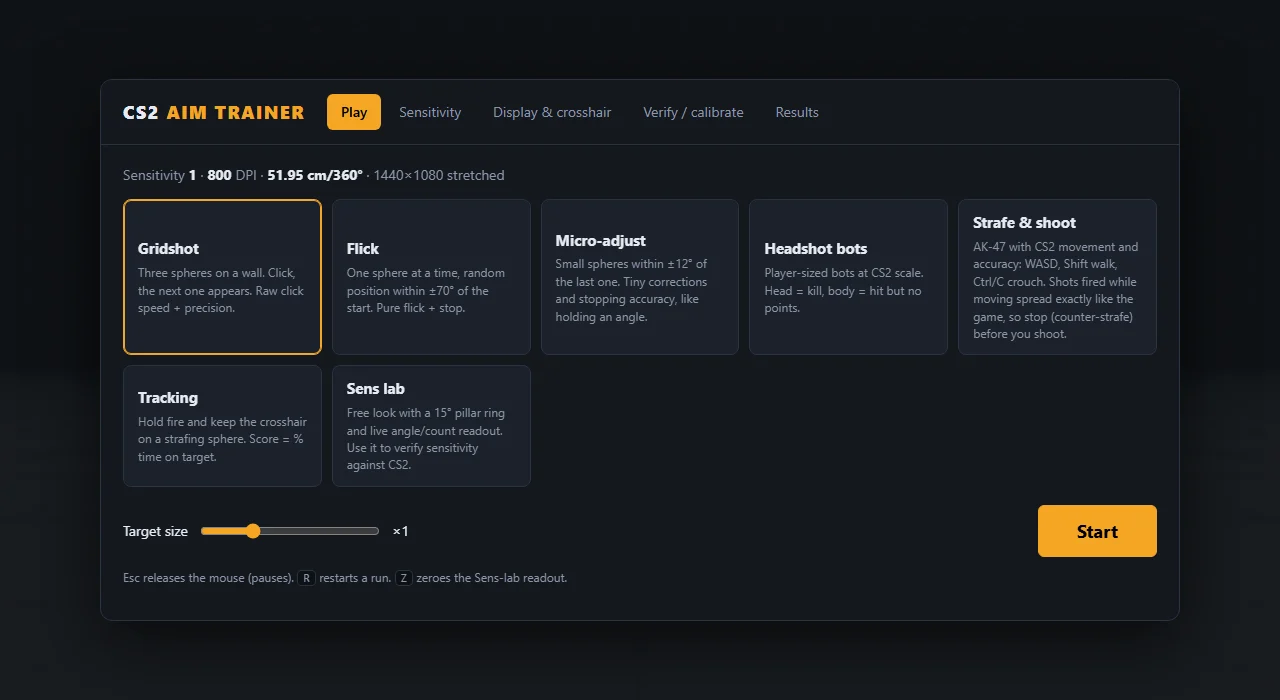
What it does
CS2 Aim Trainer
- 01
Identical to CS2
Enter your sensitivity and mouse DPI, or cm per 360°, and the trainer rotates exactly as CS2 does: sensitivity × m_yaw (0.022) degrees per mouse count.
- 02
Raw input, no games
Unadjusted mouse input, the same as m_rawinput 1, with an option to refuse to start if raw input is unavailable rather than quietly falling back.
- 03
Six drills and a lab
Gridshot, Flick, Micro-adjust, Tracking, Headshot bots at CS2 scale, and Strafe & shoot with an AK-47 and CS2 movement spread. Plus a Sens lab for free look. Pick a target size and start.
- 04
Stretched 4:3, like you play
Renders at 1440 × 1080, 1280 × 960 or 1024 × 768 with CS2’s 90° × 73.74° field of view, then stretches to your monitor exactly like CS2’s stretched 4:3.
- 05
Prove it yourself
A Sens lab and ruler test check that one full turn here is one full turn in CS2, and that your browser isn’t scaling mouse movement.
- 06
Results you can keep
Every run is logged with mode, score, accuracy, average time to kill, sensitivity and cm/360, and can be exported as CSV.
Under the hood
- Mouse
- Raw input; optional low-latency pointerrawupdate events; invert Y; count scale for scaled browsers
- Display
- Four 4:3 resolutions or native aspect; fullscreen on start; MSAA and low-latency canvas options; FPS and frame-time readout
- Crosshair
- Length, thickness, gap, colour, outline and centre dot
- Keys
- Esc pauses and releases the mouse, R restarts a run, Z zeroes the Sens-lab readout, Space ends a ruler measurement
- Checks
- Built-in self-test and performance test
Shortcuts
- Esc
- Pause and release the mouse
- R
- Restart the run
- Z
- Zero the Sens-lab readout
- Space
- Finish a ruler measurement
More apps
Fast, offline-first to-do list
Shared kanban, two tones
Hi-Lo card counting trainer