Apps / PDF editorBeta
Edit a PDF without uploading it.
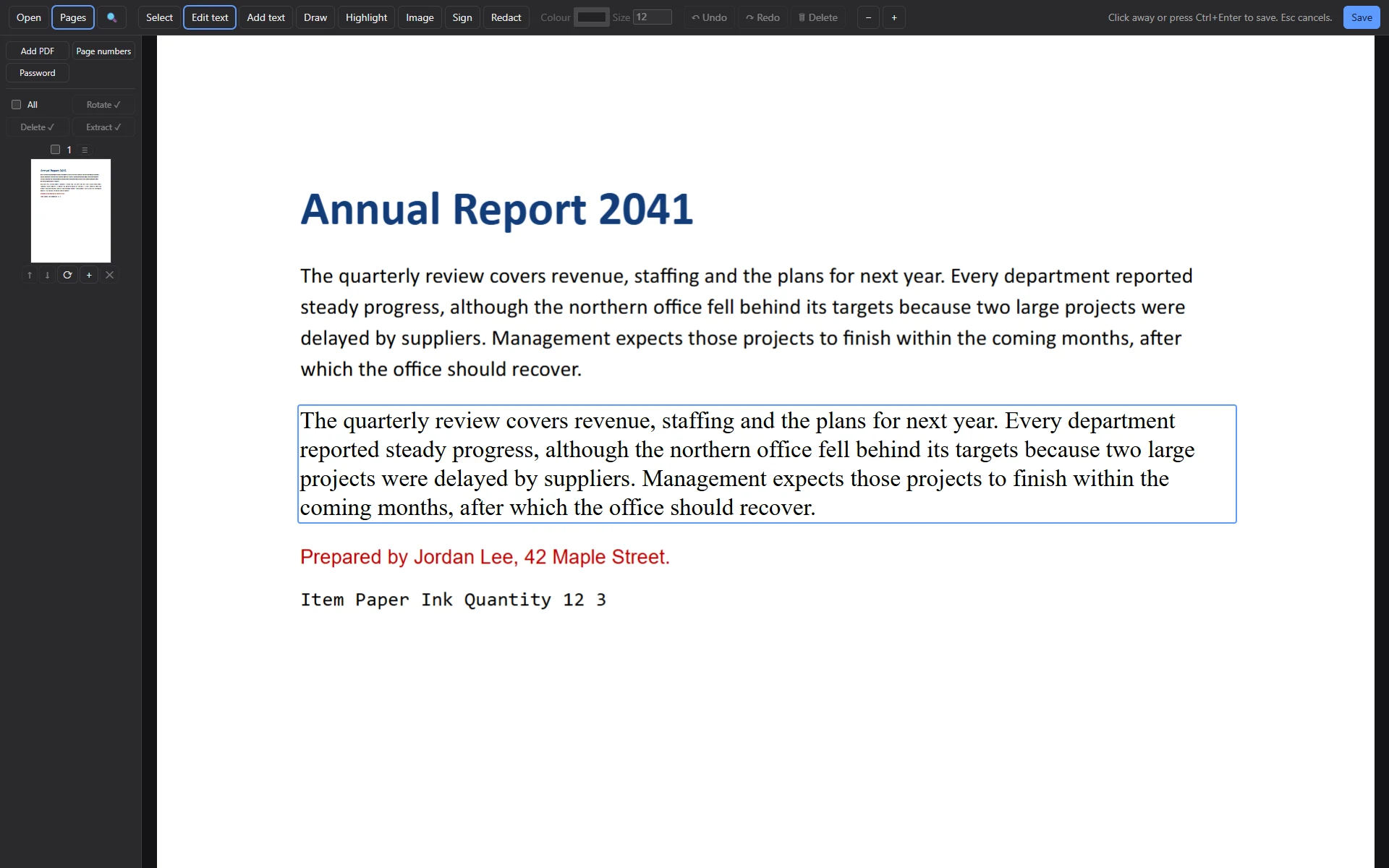
A free PDF editor that runs entirely in your browser. Change the words already on the page, sign, fill in forms, redact and rearrange pages. Your file stays on your device.
What it does
PDF Editor
- 01
Click the text and change it
Click a line and its whole paragraph opens for editing. It re-wraps as you type and keeps the document’s font when that font has the letters. Lines you don’t change stay exactly as they were.
- 02
Your file stays with you
There’s no upload and no account. The site is static files with no server behind them, and its security policy stops the page sending data to any other site.
- 03
Text stays text
Pages are never turned into images or outlines, so text stays selectable and searchable. What you add is saved as standard PDF annotations that other PDF apps can read.
- 04
Redaction that really removes
Draw a box and the text, image pixels, hidden OCR text and form values under it are taken out of the file, not just covered with black.
- 05
Sign on the page or with a certificate
Draw, type or upload a signature, or sign digitally with a .p12 or .pfx certificate file, in a box you place. For a CAC or other smart card, add a blank field and sign it in Adobe Acrobat Reader.
- 06
Mark up and rearrange
Fill in forms, add text and images, highlight and draw. Reorder, rotate, delete and extract pages, number them, and add or remove a password. One Undo button covers all of it.
Under the hood
- App
- Vite and TypeScript, a static site on Cloudflare with no back end. Installable, and works offline after the first visit
- PDF engines
- pdf.js for viewing and annotations, PDFium in WebAssembly for changing page text, LibPDF for page changes. PDFium is a 4.6 MB download, fetched the first time you use Edit text or Redact
- Privacy
- No analytics, accounts or upload. Unsaved work is kept in your browser so it can be restored after a crash, and never leaves the device
- Saving
- Chrome and Edge on a computer can keep saving to the file you choose. Other browsers download a copy, and phones offer the share sheet too. Changing a digitally signed PDF asks first, because it breaks the signature
- Signing
- PAdES signatures made in the browser and appended to the file, so earlier signatures stay valid. Your certificate and password aren’t uploaded or kept. The app doesn’t check signatures, so use Adobe or similar for that, and a signer only shows as trusted if the reader trusts the certificate’s issuer
- Limits
- Text below a paragraph doesn’t move down when the paragraph grows. Vertical text can’t be edited, and new Chinese, Arabic and similar letters only work if the original font has them. Redaction doesn’t change bookmarks or the document title
- Status
- Beta. Tested in phone emulation and Safari’s engine, not yet on a physical iPhone or Android phone. Certificate signatures were checked with OpenSSL and pyHanko, not yet in Adobe or with a real CAC
Shortcuts
- Ctrl+Z
- Undo
- Ctrl+Y
- Redo
- Ctrl+F
- Find text
- Ctrl+Enter
- Save a paragraph edit
- Esc
- Cancel a text edit
More apps
Fast, offline-first to-do list
Shared kanban, two tones
Hi-Lo card counting trainer
CS2-accurate aim practice
Beta · 2026 federal and state tax prototype
Beta · Old phone, always-on security camera
Beta · Pickup games near you
Keeps Windows responsive under load
Pauses background apps while you play CS2
Beta · Budgets, subscriptions and cash-flow forecasts
Beta · Finds bills in your email, sends invoices